
Identify hazards before they become injuries. Track, analyze, and resolve near misses with comprehensive reporting and trend analysis.
The tracker is free with no account. Want your full safety program next? Start with a free Smarter Risk account.
Sign up freeThe Near Miss Tracker is free near miss reporting software that runs in your browser: report a near miss in seconds, track it until the hazard is fixed, and see where near misses cluster. It is your complete, free solution for implementing an effective near miss reporting program. Every unreported near miss is a preview of your next workers’ compensation claim. This tool helps you identify hazards before they cause injuries, track corrective actions, and analyze trends to prevent future incidents.
Near Miss Reporting Software Features
What the free near miss app does today:
- Report near misses in seconds with date, area, category (slip/trip/fall, equipment, ergonomic, environmental, housekeeping) and a description — see reporting
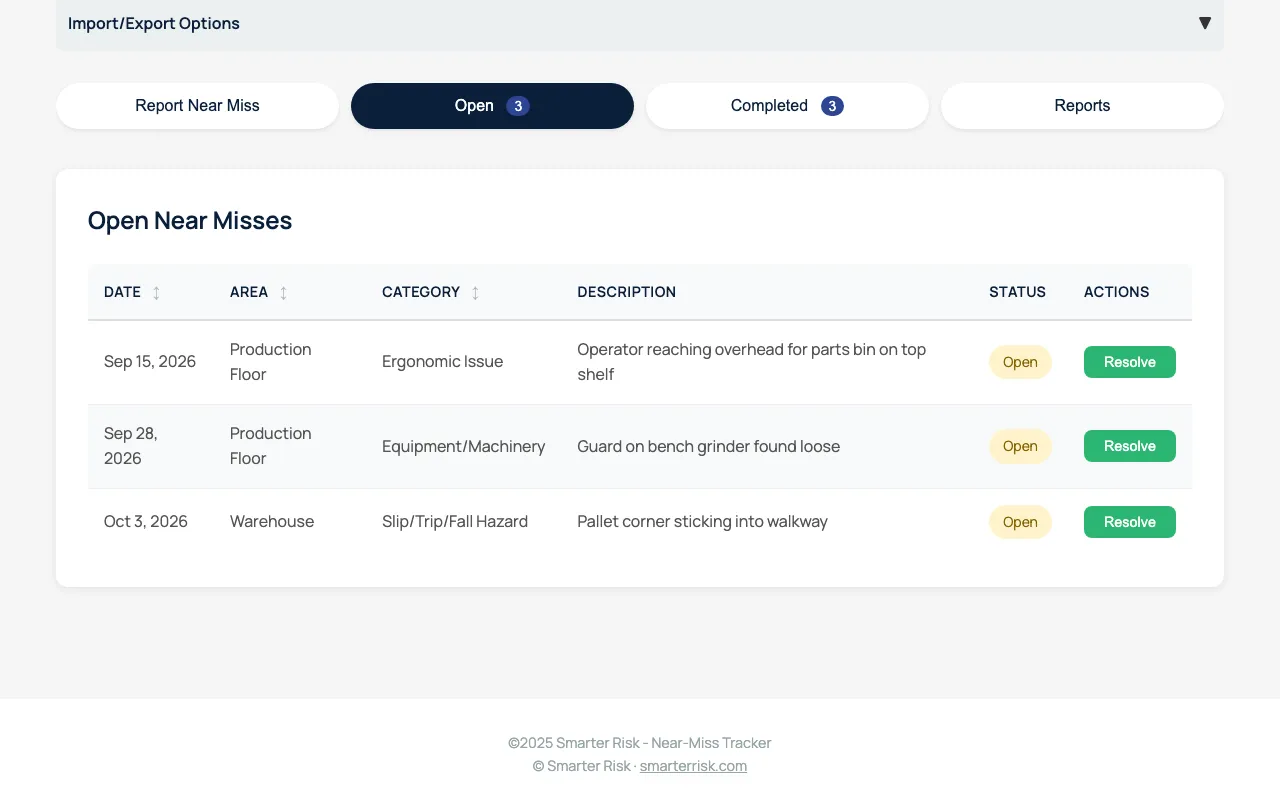
- Track open and completed near misses in sortable tables with status badges — see tracking
- Document corrective actions with a resolution date and automatic days-to-resolution — see corrective actions
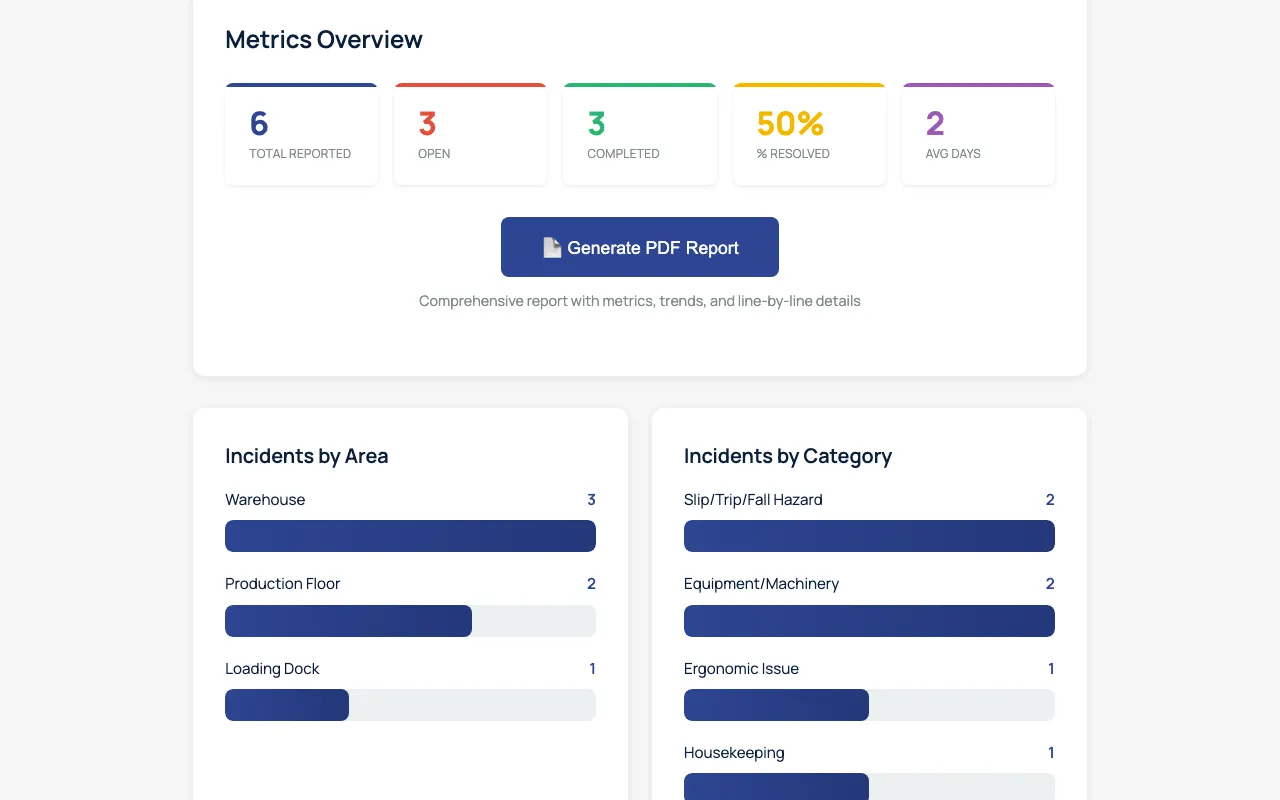
- See trends on a metrics dashboard: incidents by area and category, resolution speed and hot spots — see analytics
- Generate a PDF report for management review or a safety committee meeting
- Import and export CSV, with a blank template and merge-or-replace on import — see data management
- No account, no login — records stay in your browser
What Is a Near Miss?
A near miss is any unplanned event that could have resulted in injury, illness, or property damage but didn’t—this time. OSHA defines near misses as “close calls” that serve as warning signs of systemic hazards in your workplace. For every serious injury, there are approximately 600 near misses that went unaddressed. Each one is an opportunity to prevent the next $41,353 average workers’ compensation claim.
Why Track Near Misses?
Research from the Construction Industry Institute found that companies with proactive near miss programs reduced their Total Recordable Incident Rate (TRIR) by 50% within two years. Near miss reporting is the highest ROI move in safety—it has the lowest cost with the highest return.
Benefits of near miss tracking:
- Prevent injuries before they occur - Identify and eliminate hazards proactively
- Reduce workers’ compensation costs - Stop claims before they happen
- Lower insurance premiums - Fewer incidents mean lower EMR and reduced premiums
- Build safety culture - Engage employees in hazard identification
- Demonstrate OSHA compliance - Show proactive safety management during inspections
- Identify trends and patterns - Discover recurring hazards that need systematic solutions
Key Features
📝 Easy Near Miss Reporting
- Simple form - Report near misses in seconds with intuitive fields
- Pre-defined categories - Slip/trip/fall, equipment, ergonomic, environmental, housekeeping
- Location tracking - Identify high-risk areas (warehouse, production floor, loading dock, etc.)
- Date stamping - Automatic tracking of when incidents occurred
- Description field - Capture what happened and the potential hazard
📊 Track Open and Completed Near Misses
- Open incidents tab - View all unresolved near misses requiring action
- Completed incidents tab - Track resolved near misses with corrective actions
- Status badges - Visual indicators for open vs. completed status
- Sortable tables - Click column headers to sort by date, area, or category
- Quick actions - Mark incidents as resolved directly from the table
✅ Document Corrective Actions
- Resolution workflow - Structured process for closing out near misses
- Corrective action field - Document what was done to prevent recurrence
- Resolution date tracking - Record when hazards were addressed
- Days to resolution - Automatic calculation of response time
- Accountability - Clear record of follow-through on identified hazards
📈 Comprehensive Analytics and Reporting
- Metrics dashboard - Total reported, open, completed, % resolved, average days to resolution
- Incidents by area - Visual breakdown showing which locations have the most near misses
- Incidents by category - Identify the most common types of hazards
- Resolution speed analysis - Track how quickly near misses are addressed
- Hot spots identification - Discover area + category combinations with highest frequency
- PDF report generation - Professional reports with all metrics, trends, and line-by-line details
💾 Data Management
- Local storage - Your data persists between sessions in your browser
- CSV export - Download all data for backup and sharing with your team
- CSV import - Restore from backup or import data from other sources
- Blank template download - Get a CSV template for bulk imports
- Merge or replace options - Choose to add to existing data or start fresh when importing
Screenshots
Why Use the Smarter Risk Near Miss Tracker?
- ✅ 100% Free — No account, no login, no limits
- 💾 Your Data Stays Local — All data stored in your browser (with CSV backup)
- 📤 CSV Import/Export — Full backup and restore capability
- 📊 Instant Analytics — Real-time metrics and trend analysis
- 📄 PDF Reports — Generate comprehensive reports for management review
- 📱 Works Anywhere — Use on desktop, tablet, or mobile
- 🔒 Privacy First — Near miss records stay in your browser; the live page runs site analytics
- 🎯 Best Practice Aligned — Built on proven near miss reporting frameworks
How It Compares
| This free Near Miss Tracker | Typical paid near miss software | What a Smarter Risk plan adds | |
|---|---|---|---|
| Getting started | Open the page and report — no account, no login | Usually a demo request, trial or sales quote first | A free Smarter Risk account (Bright plan) |
| Reporting and corrective actions | Report form, open/completed tracking, corrective action and days to resolution | Reporting forms and corrective-action workflows | — (the tracker stays the free reporting tool) |
| Reports | Metrics dashboard, area and category breakdowns, hot spots, PDF report | Dashboards and reports | A Risk Report you can print or export (paid plans) |
| Where records live | In your browser on one device; share by CSV export and import | Usually online accounts for multiple users | Your account in the Smarter Risk app |
| Safety program | — | Varies by vendor | A safety assessment, recommendations and a risk score on every plan; Policy Builder and Forms Library on the Intelligent plan |
The tracker is the free way to start a near miss program today. A Smarter Risk plan covers the rest of the safety program the near misses point to.
How to Use the Near Miss Tracker
Getting Started
- Launch the tracker - Click the button above or visit directly
- Report your first near miss - Use the “Report Near Miss” tab
- Track open incidents - View unresolved near misses in the “Open” tab
- Resolve incidents - Mark near misses as completed with corrective actions
- Analyze trends - Use the “Reports” tab to identify patterns and hot spots
- Export regularly - Download CSV backups to preserve your data
Reporting a Near Miss
- Click the “Report Near Miss” tab
- Enter the date of the incident
- Select the area/location where it occurred
- Choose the category that best describes the hazard
- Describe what happened and the potential hazard
- Click “Submit Near Miss”
- The incident is now logged and appears in the “Open” tab
Resolving a Near Miss
- Go to the “Open” tab to view unresolved incidents
- Click “Resolve” on the incident you’ve addressed
- Enter the date the hazard was resolved
- Document the corrective action taken to prevent recurrence
- Click “Mark as Resolved”
- The incident moves to the “Completed” tab with full documentation
Analyzing Your Data
- Click the “Reports” tab to view comprehensive analytics
- Review key metrics: total reported, open, completed, % resolved, average days
- Examine “Incidents by Area” to identify high-risk locations
- Review “Incidents by Category” to find the most common hazard types
- Check “Resolution Speed” to ensure timely follow-through
- Identify “Hot Spots” - area + category combinations with highest frequency
- Click “Generate PDF Report” for a comprehensive document with all data
Data Backup — CRITICAL!
- ⚠️ Export regularly - Your CSV export is your only backup
- Save the CSV file with your other safety records (network drive, cloud storage, etc.)
- If you lose browser data, you can ONLY restore from your CSV backup
- No server backup - Smarter Risk does not save your data anywhere
Why Backup is Critical
- Browser data can be lost if you clear cache/cookies
- Computer crashes or browser updates can erase local data
- Switching browsers or devices means starting over without a backup
- Your CSV export is the ONLY way to recover your near miss records
Recommended Backup Schedule
- Weekly if you have active near miss reporting
- Monthly minimum for ongoing tracking
- Before clearing browser data or switching devices
- After significant data entry (multiple new reports)
Best Practices for Near Miss Reporting
Create a No-Blame Culture
The program must be explicitly non-punitive. Employees who fear discipline won’t report near misses. Make it clear that reporting is valued and that the goal is hazard elimination, not fault-finding. Celebrate near miss reports as proactive safety contributions.
Require Weekly Identification
Require teams to identify at least one near miss per week. This creates a proactive mindset where employees actively look for hazards rather than waiting for them to become obvious.
Respond Rapidly
Near misses must be addressed quickly. When employees report a hazard and see it corrected immediately, they trust the system and continue reporting. When reports disappear into a black hole, reporting stops.
Analyze for Patterns
Look for recurring hazards, specific locations, particular tasks, or times of day when near misses cluster. This analysis guides where to focus training, engineering controls, or procedural changes.
Communicate Findings
Review reported near misses with the entire team regularly. Discuss what was found, what corrective actions were taken, and why it matters. This keeps everyone informed and reinforces that the program is active and effective.
Integration with Your Safety Program
A near miss reporting program doesn’t exist in isolation—it’s most effective when integrated into a comprehensive safety management system. The Near Miss Tracker works best when employees understand the broader safety policies, have been trained on hazard recognition, and see management commitment to continuous improvement.
Three components work together:
Written Safety Program - Your safety program establishes the framework, including investigation procedures and corrective action protocols. The written program defines what safety is in your organization.
Employee Training - Training gives employees the knowledge to identify hazards and understand why reporting matters. Courses on hazard recognition, Job Hazard Analysis, and building safety culture provide the foundation.
Near Miss Tracking - The Near Miss Tracker brings the policy and training to life through daily practice. The key is making reporting easy and ensuring visible follow-through.
When these three elements align, near miss reporting becomes more than a program—it becomes part of your safety culture.
Frequently Asked Questions
What is a near miss in workplace safety?
A near miss is any unplanned event that could have resulted in injury, illness, or property damage but didn’t—this time. Examples include a forklift nearly striking a pedestrian, a tool falling from height but missing workers below, or an employee slipping but catching themselves before falling.
Why is near miss tracking important?
Near miss tracking identifies hazards before they cause injuries. For every serious injury, there are approximately 600 near misses that went unaddressed. Each near miss is an opportunity to prevent the next $41,353 workers’ compensation claim and avoid EMR increases that raise premiums for three years.
How do I get employees to report near misses?
The program must be explicitly non-punitive. Employees who fear discipline won’t report near misses. Make it clear that reporting is valued and that the goal is hazard elimination, not fault-finding. When employees report a hazard and see it corrected immediately, they trust the system and continue reporting.
What if I lose my data?
As long as you’ve exported to CSV, you can restore everything by importing that file. Without a CSV backup, your data cannot be recovered if browser data is lost. We strongly recommend exporting regularly.
Can I share this data with my team?
Yes! Export to CSV and share the file with your safety team, management, or anyone who needs access. They can import the CSV into their own instance of the tracker to view and analyze the data.
Does OSHA require near miss reporting?
While OSHA doesn’t explicitly require near miss reporting programs, they strongly encourage them as a best practice. OSHA’s General Duty Clause requires employers to provide a workplace “free from recognized hazards.” Near misses are, by definition, recognized hazards.
How often should employees report near misses?
Require teams to identify at least one near miss per week. This creates a proactive mindset where employees actively look for hazards rather than waiting for them to become obvious.
What should I do with the PDF reports?
Use PDF reports for management review, safety committee meetings, quarterly safety reviews, or to demonstrate proactive safety management during OSHA inspections. They provide a comprehensive snapshot of your near miss program’s effectiveness.
Is this tracker really free?
Yes, completely free. The Near Miss Tracker is provided by Smarter Risk as a public resource. There’s no login, subscription, or hidden fees—just a comprehensive, practical tool for improving workplace safety. The live page runs site analytics, but your near miss records stay in your browser.
Can I use this on my phone or tablet?
Yes! The tracker is fully responsive and works on desktop, tablet, and mobile devices. Report near misses from anywhere, anytime.
How does this integrate with the OSHA Recordable App?
The Near Miss Tracker helps you prevent incidents before they become OSHA recordable injuries. Use the Near Miss Tracker proactively to identify and eliminate hazards, and use the OSHA Recordable App when injuries do occur to determine recordability and maintain your 300 Log.
Is there free near miss reporting software?
Yes. The Smarter Risk Near Miss Tracker is free near miss reporting software that runs in your web browser. You can report near misses, track corrective actions, analyze trends and create PDF reports with no account, login or fees.
Does this near miss software track corrective actions?
Yes. When you resolve a near miss you record the corrective action and the resolution date, and the tracker calculates the days to resolution. Resolved near misses move to the Completed tab with that record.
What reports does the near miss app create?
The Reports tab shows total reported, open, completed, percent resolved and average days to resolution, plus incidents by area, incidents by category, resolution speed and hot spots. One click creates a PDF report with the metrics and line-by-line details.
Can I import near miss records from a spreadsheet?
Yes, from a CSV file. Download the blank CSV template, fill it in, and import it. On import you choose to merge with your existing records or replace them.
Can construction crews use this near miss reporting app on site?
Yes, on any phone, tablet or laptop browser. Each device keeps its own records, so crews share them by exporting a CSV and importing it into one tracker with the merge option.
Does the near miss tracker store my reports on a server?
No. Your near miss reports are saved only in your browser and are not uploaded to Smarter Risk. The live page runs site analytics. Export a CSV backup of your records regularly.
Related Resources
Blog Posts
Near Miss Reporting Program: How to Create One
Complete guide to implementing an effective near miss reporting program in your workplace.Understanding Your Experience Modification Rate (EMR)
Learn how preventing injuries through near miss reporting impacts your EMR and workers’ compensation premiums.
Toolbox Talks
The Importance of Near Miss Reporting
Short safety discussion on why near miss reporting matters and how to participate effectively.Situational Awareness on the Jobsite
Train employees to maintain awareness and identify workplace hazards before they cause injuries.
Training Courses
Building a Strong Safety Culture
Comprehensive training on creating a workplace culture where near miss reporting thrives.Job Hazard Analysis (JHA) Training
Learn systematic hazard identification techniques that complement near miss reporting.Workplace Safety Inspections
Training on conducting effective safety inspections to identify near miss conditions.
Smarter Risk simplifies safety, training, and risk control for small businesses.
Learn more at smarterrisk.com.
Put this into practice. Take our free 15-minute assessment and SmarterRisk builds your safety program, training, and Risk Report automatically.
Start your free assessment