
Check recordability, maintain your 300 Log, generate 300A summaries, create 301 forms, and calculate incident rates — all in one free tool
The app is free with no account. Want your full safety program next? Start with a free Smarter Risk account.
Sign up freeThe OSHA Recordable and Logging App is free OSHA recordkeeping software that runs in your browser: keep your OSHA 300 log, generate the 300A summary and 301 forms, and export the 300 log and 300A summary as an Excel workbook. It is your complete, free solution for OSHA recordkeeping compliance. Whether you need to check if an incident is recordable, maintain your OSHA 300 Log, generate your annual 300A Summary, create 301 incident reports, or calculate your incident rates — this all-in-one tool has you covered.
OSHA Recordkeeping Software Features
What the free OSHA 300 log app does today:
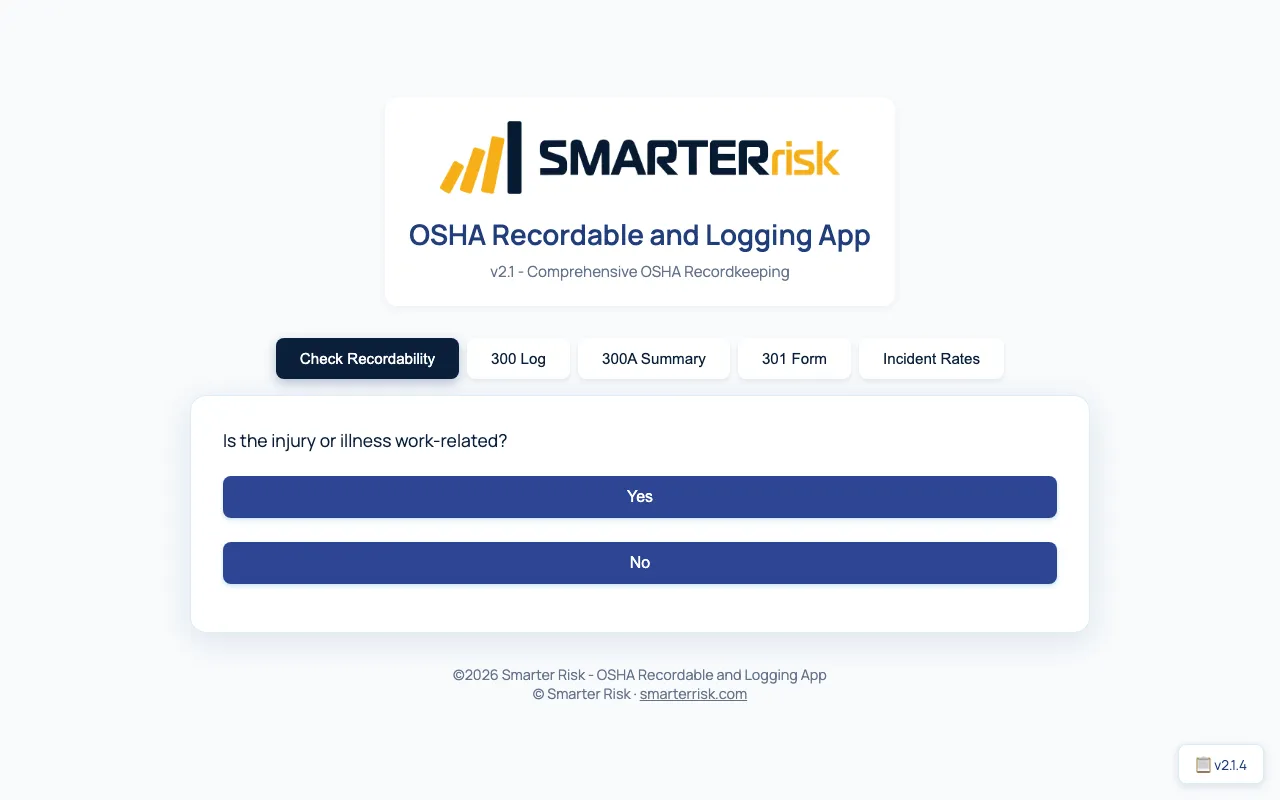
- Check recordability with step-by-step yes/no questions based on OSHA 1904
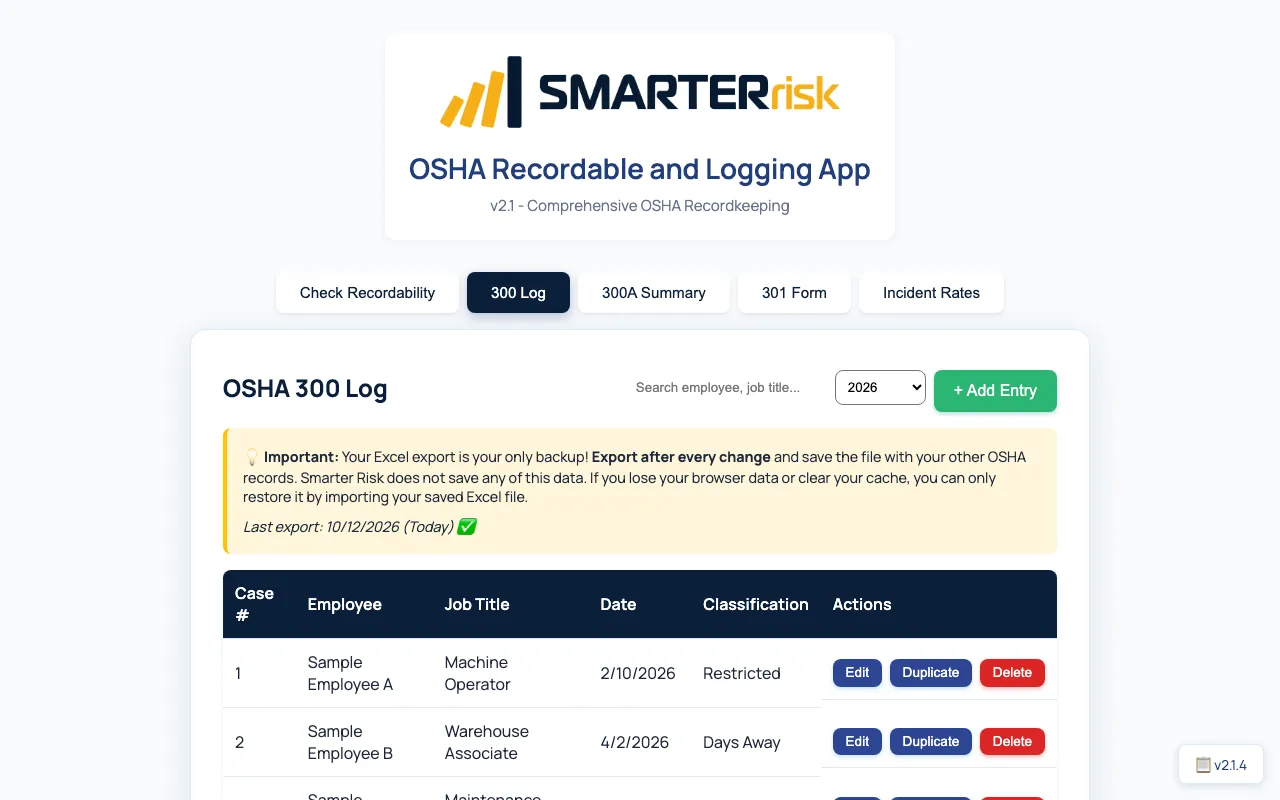
- Keep your OSHA 300 log with all required fields; add, edit, duplicate and delete entries; search by employee or job title and filter by year
- Generate the OSHA 300A summary from your log, with establishment information, a link to the Census Bureau’s NAICS lookup and ZIP code lookup
- Create OSHA 301 incident reports pre-filled from your 300 log, then print them from your browser’s print dialog
- Calculate incident rates: TRIR, DART, LTIR and Severity Rate from your log and hours worked
- Import and export Excel for the 300 log and 300A summary, with reminders to export after every change
- Save a home screen shortcut where your browser supports it; no account or login, and records stay in your browser
What’s New in Version 2.1.2
🎉 Enhanced Backup Reminders! The app now emphasizes data backup at every step:
- Export Reminder After Every Save - After adding or editing an incident, you’ll be prompted to export your data
- Enhanced Backup Warnings - Clear, prominent reminders that Excel export is your only backup
- Last Export Tracking - See when you last exported with urgent warnings if it’s been too long
- Stronger Data Loss Prevention - Multiple safeguards to ensure you never lose your OSHA records
Five Powerful Tools in One:
1. ✅ Recordability Checker
- Instantly determine if an incident is OSHA recordable or reportable
- Step-by-step guided questions based on OSHA 1904 standards
- Clear guidance on reporting requirements and deadlines
- Direct links to OSHA reporting resources
2. 📋 OSHA 300 Log Manager
- Maintain your complete OSHA 300 Log with all required fields
- Add, edit, and delete incident entries
- Search and filter by employee name, job title, or year
- Excel Import/Export - Your data, your backup (export after every change!)
- Automatic Export Reminders - Never forget to back up your data
- Last Export Tracking - See when you last exported with warnings if overdue
- Automatic classification tracking (death, days away, restricted, other)
- Track injury types, body parts affected, and days lost
3. 📊 OSHA 300A Summary Generator
- Automatically generate your annual 300A Summary from your log data
- Enter establishment information (company name, address, NAICS code)
- Calculate total injuries, illnesses, and days lost
- ZIP code lookup for automatic city/state population
- Export to Excel for posting requirements
- Validation warnings to ensure accuracy
4. 📄 OSHA 301 Incident Report Forms
- Generate pre-filled 301 forms for any logged incident
- Fields populated from your 300 Log entry; review for missing details before printing
- Print-ready format: print it from your browser’s print dialog
- Includes employee information, incident details, and treatment information
5. 📈 Incident Rate Calculator
- Calculate key safety metrics automatically:
- TRIR (Total Recordable Incident Rate)
- DART Rate (Days Away, Restricted, or Transfer)
- LTIR (Lost Time Incident Rate)
- Severity Rate (Total days lost per 100 workers)
- Compare your rates against industry benchmarks
- Based on your actual log data and hours worked
Screenshots
Why Use the Smarter Risk OSHA Recordkeeping App?
- ✅ 100% Free — No account, no login, no limits
- 💾 Your Data Stays Local — All data stored in your browser (with Excel backup)
- 📤 Excel Import/Export — Full backup and restore capability
- ⚡ Instant Calculations — Automatic incident rate calculations
- 📱 Works Anywhere — Use on desktop, tablet, or mobile
- 📲 Home Screen Shortcut — Save the app to your home screen where your browser supports it
- 🔒 Privacy First — Incident records stay in your browser; export an Excel backup regularly
- 🎯 OSHA Compliant — Built to match official OSHA forms and requirements
Home Screen Shortcut
You can save a shortcut for quick access where your browser supports it. You need an internet connection to open the app and load its Excel library:
- On Mobile: Use your browser’s “Add to Home Screen” option if available
- On Desktop: Use your browser’s install or shortcut option if available
- After Opening: Your incident records remain in your browser’s local storage; export an Excel backup regularly
Key Features
Data Management
- LocalStorage - Your data persists between sessions
- Excel Backup - Export your entire 300 Log and 300A Summary
- Excel Import - Restore from backup or migrate data
- Search & Filter - Find incidents by employee, job title, or year
- Year Filtering - View incidents by specific year
Comprehensive Incident Tracking
- Employee information (name, job title, DOB, address, hire date)
- Incident details (date, time, location, description)
- Classification (death, days away, restricted, other recordable)
- Injury/illness types (injury, skin disorder, respiratory, poisoning, hearing loss, other)
- Body parts affected
- Days away from work and restricted duty days
- Treatment information (physician, facility, ER visit, hospitalization)
- Return to work dates
Establishment Information
- Company name and address
- A link to the Census Bureau’s NAICS lookup
- Annual average employees
- Total hours worked
- Automatic ZIP code to city/state lookup
Validation & Compliance
- Required field validation
- Data integrity checks
- OSHA reporting deadline reminders
- Classification guidance
- First aid vs. medical treatment determination
How It Compares
| This free OSHA recordkeeping app | Typical paid OSHA recordkeeping software | What a Smarter Risk plan adds | |
|---|---|---|---|
| Getting started | Open the page and start logging — no account, no login | Usually a demo request or sales quote first | A free Smarter Risk account (Bright plan) |
| OSHA forms | 300 log, 300A summary and 301 forms from one set of data | 300, 300A and 301 forms | — (the app stays the free recordkeeping tool) |
| Incident rates | TRIR, DART, LTIR and Severity Rate | Usually TRIR and DART dashboards | A risk score on every plan |
| Where records live | In your browser on one device; Excel export is your backup | Usually online accounts for multiple users | Your account in the Smarter Risk app |
| Safety program | — | Varies by vendor | A safety assessment and recommendations on every plan; a Risk Report you can print or export on paid plans; Policy Builder and Forms Library on the Intelligent plan |
The app is the free way to keep your OSHA logs today. A Smarter Risk plan covers the rest of the safety program behind the numbers.
OSHA 300 Log Excel Template vs. This App
Many employers search for an OSHA 300 log Excel template or a fillable OSHA 300 log. A spreadsheet holds the rows, but you total the 300A by hand and copy each case into a 301 form yourself. This app keeps the spreadsheet and does that work for you:
- Export to Excel any time — the “Export 300 & 300A (Excel)” button saves your 300 log and 300A summary as an Excel file you can keep with your OSHA records
- Import from Excel — re-import an Excel file the app exported to restore your log or move it to another computer or browser
- The 300A totals itself — injuries, illnesses and days lost are counted from your log, ready to post February 1 – April 30
- 301 forms come from the same data — no retyping a case into a separate form
- Incident rates are calculated for you — TRIR, DART, LTIR and Severity Rate from your hours worked
For 300A deadlines and who must file, see the OSHA 300A form guide, and our guide to OSHA 300 log requirements explains who must keep the log and what to record.
OSHA Reporting Requirements
Employers are required to notify OSHA when an employee is:
- Killed on the job
- Hospitalized as an in-patient
- Suffers an amputation or loss of an eye
Time limits for reporting:
- Fatalities — within 8 hours
- Hospitalizations, amputations, or eye losses — within 24 hours
You can report directly to OSHA online or by phone at 1-800-321-6742 (OSHA).
👉 Report a Fatality or Severe Injury to OSHA
OSHA Recordkeeping Requirements
All other OSHA-recordable injuries and illnesses must be logged on the OSHA 300 form.
You are required to maintain these logs if your business has more than 10 employees and is not on the OSHA partially-exempt industry list.
Visit the OSHA Recordkeeping Guidelines for complete details.
Difference Between OSHA Recordable and Reportable
| Type | When It Applies | Employer Action |
|---|---|---|
| Recordable | Injuries or illnesses requiring medical treatment beyond first aid, loss of consciousness, or restricted work. | Log on OSHA 300 form. |
| Reportable | Fatalities, in-patient hospitalizations, amputations, or eye losses. | Notify OSHA within 8 or 24 hours. |
The Smarter Risk OSHA Recordable App helps you determine which category your case falls into — instantly and accurately.
How to Use the OSHA Recordkeeping App
Getting Started
- Launch the app - Click the button above or visit directly
- Choose your tool - Select from 5 tabs based on your need:
- Check Recordability
- Maintain 300 Log
- Generate 300A Summary
- Create 301 Forms
- Calculate Incident Rates
For Recordability Checking
- Answer simple yes/no questions about the incident
- Get immediate guidance on whether it’s reportable, recordable, or non-recordable
- Follow links to appropriate OSHA forms or reporting sites
For 300 Log Management
- Click “Add Entry” to log a new incident
- Fill in all required fields (employee name, incident date, description, classification)
- Add optional details (treatment info, physician, facility)
- Save and your incident is logged
- Export to Excel regularly as your backup
For 300A Summary
- Enter your establishment information (company name, address, etc.)
- Input annual average employees and total hours worked
- The app automatically calculates your summary statistics from your log
- Export to Excel for posting requirements
For 301 Forms
- Select an incident from your log
- The app displays a print-ready 301 form using the details saved in that 300 Log entry
- Review it for missing details, edit the log entry if needed, then print from your browser’s print dialog
For Incident Rates
- Ensure your establishment info includes total hours worked
- The app automatically calculates TRIR, DART, LTIR, and Severity Rate
- Compare against industry benchmarks
Best Practices
Data Backup — CRITICAL!
- ⚠️ Export after EVERY change - Your Excel export is your only backup
- The app will remind you - After saving an entry, you’ll be prompted to export
- Save the Excel file with your other OSHA records (network drive, cloud storage, etc.)
- Check the “Last Export” date - The app shows when you last exported
- If you lose browser data, you can ONLY restore from your Excel backup
- No server backup - Smarter Risk does not save your data anywhere
Why Backup is Critical
- Browser data can be lost if you clear cache/cookies
- Computer crashes or browser updates can erase local data
- Switching browsers or devices means starting over without a backup
- Your Excel export is the ONLY way to recover your OSHA records
Recommended Backup Schedule
- Immediately after adding or editing any incident
- Weekly if you have active incidents
- Monthly minimum for ongoing recordkeeping
- Before clearing browser data or switching devices
Data Privacy
- Your incident records stay in your browser’s local storage; nothing is uploaded to Smarter Risk. The optional ZIP lookup sends only the ZIP code to a public lookup service, and the site runs the same analytics as every page.
- Clear browser data will erase the app data (export first!)
Annual Workflow
- Throughout the year: Log incidents as they occur and export after each entry
- Export to Excel after every change as your backup
- At year-end: Generate 300A Summary
- Post 300A Summary from February 1 - April 30
- Maintain records (and Excel backups) for 5 years per OSHA requirements
Frequently Asked Questions
How do I know if an injury is OSHA recordable?
Use the Recordability Checker tab in the app. Answer a few simple questions and get instant guidance. Generally, any work-related injury or illness requiring medical treatment beyond first aid, or that causes loss of consciousness, restricted work, or job transfer, is OSHA recordable.
Can I use this app to maintain my official OSHA 300 Log?
Yes! The 300 Log tab includes all required OSHA fields. Export to Excel regularly as your backup. The Excel export matches OSHA’s format and can serve as your official log.
What if I lose my data?
As long as you’ve exported to Excel, you can restore everything by importing that file. This is why we strongly recommend exporting after every change. The app will remind you to export after saving entries. Without an Excel backup, your data cannot be recovered if browser data is lost.
Do small businesses need to keep OSHA logs?
Most businesses with more than 10 employees must keep OSHA logs unless they fall under OSHA’s list of partially exempt industries. Check OSHA’s exemption list.
What’s the difference between OSHA 300, 300A, and 301 forms?
- OSHA 300: Log of work-related injuries and illnesses (maintained throughout the year)
- OSHA 300A: Annual summary posted at the workplace (February 1 - April 30)
- OSHA 301: Individual incident report form (one per incident)
The app helps you create and maintain all three forms.
How do I calculate my incident rates?
The Incident Rates tab automatically calculates TRIR, DART, LTIR, and Severity Rate based on your log data and total hours worked. Just enter your establishment information including total hours worked for the year.
What are good incident rates?
It varies by industry. Compare your rates against your industry’s national average at www.bls.gov/iif. Generally, lower rates indicate better safety performance.
Is this app really free?
Yes, completely free. The OSHA Recordable and Logging App is provided by Smarter Risk as a public resource. There’s no login, subscription, or hidden fees — just a comprehensive, accurate compliance tool.
Can I use this on my phone or tablet?
Yes. The app works on desktop, tablet, and mobile browsers. On supported browsers you can add a home screen shortcut for quick access; you still need an internet connection to open the app.
How do I install the app on my phone?
If your mobile browser offers “Add to Home Screen,” choose it from the browser menu to save a shortcut. Browser prompts vary, and the shortcut still needs an internet connection to open the app.
Does the app work offline?
No. The app stores incident records in your browser, but it does not cache the app for offline use. You need an internet connection to open it and load the Excel library. Export an Excel backup regularly so your records are safe if browser data is lost.
How long should I keep OSHA records?
OSHA requires you to maintain records for 5 years following the year to which they relate. Keep your Excel exports as permanent backups.
What if I need help with OSHA compliance beyond recordkeeping?
Smarter Risk offers comprehensive safety training, risk assessments, and safety program development. Visit smarterrisk.com to learn more.
Is there free OSHA recordkeeping software?
Yes. The Smarter Risk OSHA Recordable and Logging App is free OSHA recordkeeping software that runs in your web browser. It keeps your OSHA 300 log, generates the 300A summary and 301 forms, checks recordability and calculates incident rates, with no account, login or fees.
Does this OSHA 300 log software handle the 300A summary?
Yes. The 300A Summary tab totals injuries, illnesses and days lost from your 300 log. You add your establishment information, annual average employees and total hours worked, then export the summary to Excel for posting.
Can I keep my OSHA 300 log in Excel with this app?
Yes. Export your 300 log and 300A summary to Excel at any time and keep the file as your backup. To restore your log, import an Excel file the app exported.
Can I create and print OSHA 301 forms with this app?
Yes. The 301 Form tab displays a read-only report pre-filled from a case in your 300 log. Review it for missing details, edit the log entry if needed, then print it from your browser’s print dialog.
Does the app calculate TRIR and DART rates?
Yes. The Incident Rates tab calculates TRIR, DART, LTIR and Severity Rate from your log data and the total hours worked you enter in your establishment information.
Does this OSHA reporting software send my records to OSHA?
No. Your incident records stay in your browser’s local storage; nothing is uploaded to Smarter Risk. The optional ZIP lookup sends only the ZIP code to a public lookup service, and the site runs the same analytics as every page. Nothing is submitted to OSHA: the app produces your 300 log, 300A summary and 301 forms for you to keep, post and submit yourself.
Smarter Risk simplifies safety, training, and risk control for small businesses.
Learn more at smarterrisk.com.
Put this into practice. Take our free 15-minute assessment and SmarterRisk builds your safety program, training, and Risk Report automatically.
Start your free assessment